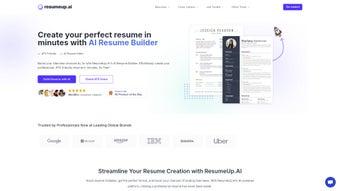

Download ResumeUp – AI‑Powered Resume Builder & Optimizer
Overview
In today’s hyper‑competitive job market, a well‑crafted résumé can be the decisive factor that lands you an interview. ResumeUp steps into this landscape as a comprehensive, web‑based solution that blends artificial intelligence with practical recruiting insights. Built to serve both fresh graduates and seasoned professionals, the platform offers a full suite of tools that go far beyond a simple template generator.
Its core strength lies in the integrated ATS (Applicant Tracking System) checker, which scans your document for the exact keywords recruiters are searching for, ensuring that your résumé doesn’t get lost in the automated filters that many large companies employ. The AI‑driven Keyword Scanner extracts high‑impact terms from job postings, while the Bullet Point Generator crafts concise, achievement‑focused statements that highlight your value proposition. For those who struggle with summarising their career narrative, the Summary Generator provides a polished, compelling opening paragraph in seconds.
Beyond résumé creation, ResumeUp expands into related career assets: a Cover Letter Generator personalises each application, a Job Application Tracker keeps you organised across multiple opportunities, and a suite of LinkedIn utilities—Headline and Summary Generators—helps you maintain a cohesive professional brand online. The platform also includes a Resume Synonyms Generator, which injects variety into repetitive phrasing, and a professional bio creator for networking events or personal websites. All of these features are accessible through an intuitive, browser‑based interface, meaning you can work from any device without installing heavyweight software.
Whether you are polishing an existing résumé or starting from scratch, ResumeUp delivers a secure, constantly updated environment that aligns with the latest hiring trends, giving you a genuine edge in the job‑search process.
Key Features & Tools
- AI‑Powered ATS Checker – Real‑time analysis for recruiter‑friendly formatting and keyword density.
- Keyword Scanner – Extracts top‑ranking keywords from any job description to tailor your résumé.
- Bullet Point Generator – Transforms raw achievements into concise, impact‑focused statements.
- Summary Generator – Crafts a compelling professional summary in under a minute.
- Skills Generator – Recommends industry‑specific hard and soft skills based on your experience.
- Cover Letter Generator – Produces personalised cover letters that match the tone of each job posting.
- Job Application Tracker – Centralises applications, interview dates, and offers for efficient follow‑up.
- Job Description Keyword Finder – Parses posted listings to surface essential keywords instantly.
- LinkedIn Headline & Summary Generators – Aligns your résumé language with your online professional brand.
- Resume Synonyms Generator – Improves language variety, avoiding repetitive phrasing.
- Professional Bio Creator – Generates concise bios for networking events, personal websites, or speaker introductions.
- Secure Cloud Storage – Saves all documents and tracking data with end‑to‑end encryption.
- Regular AI Model Updates – Keeps the platform aligned with the latest ATS algorithms and hiring trends.
Each of these tools is designed to function as a modular component that you can employ independently or combine for a full‑stack résumé overhaul. For example, you might start with the Keyword Scanner to identify the most relevant buzzwords, feed those into the Bullet Point Generator for polished achievements, and then run the final document through the ATS Checker to verify compliance. The Cover Letter Generator uses the same keyword database, ensuring that both résumé and cover letter speak the same language to hiring managers.
The Job Application Tracker integrates seamlessly with Google Calendar, sending you reminders for upcoming interviews or follow‑up emails. All features are accessible through a clean dashboard that categorises tasks by “Create,” “Optimize,” and “Track,” making it easy for users of any technical level to navigate. The platform also supports multi‑language output, allowing job seekers targeting international positions to generate localized résumé versions with appropriate keyword variations.
By centralising every step of the application pipeline, ResumeUp reduces the time spent toggling between separate tools and spreadsheets, letting you focus on the strategic aspects of your career progression.
Installation, Compatibility & How to Use ResumeUp
One of the biggest advantages of ResumeUp is that it is entirely web‑based, eliminating the need for bulky installations or operating‑system‑specific binaries. All you need is a modern browser (Chrome, Firefox, Safari, or Edge) and an internet connection. The platform is optimised for both desktop and mobile environments, meaning you can draft, edit, and track applications from a laptop, tablet, or smartphone without losing functionality. Because it runs in the cloud, your data is stored securely on encrypted servers, and you can access your projects from any device simply by logging into your account.
Compatibility (itemprop="operatingSystem"): Windows 10/11, macOS Ventura and later, Linux distributions with modern browsers, Android 8+ and iOS 13+. The responsive design automatically adjusts UI elements for touch interaction on mobile devices, while preserving the full feature set available on desktop.
Getting Started – Step‑by‑Step Guide:
- Create an Account: Visit ResumeUp.com and sign up using your email address or a social login (Google, LinkedIn). A verification email ensures account security.
- Select a Template: Choose from a library of ATS‑friendly templates that are already formatted for readability by both humans and machines.
- Run the Keyword Scanner: Paste a job description into the scanner. ResumeUp extracts the top 15–20 keywords and presents them in a ranked list.
- Generate Content: Use the Bullet Point Generator and Summary Generator to populate each section of your résumé with AI‑crafted language that incorporates the identified keywords.
- Optimize with ATS Checker: Click “Run ATS Check” to receive a detailed report highlighting any missing keywords, overused phrases, or formatting issues that could cause rejection.
- Create Supporting Documents: Leverage the Cover Letter Generator and LinkedIn utilities to keep your entire application ecosystem aligned.
- Track Applications: Add each job you apply for to the Job Application Tracker. Set reminders for follow‑up emails, interview dates, or offer negotiations.
- Export & Share: Download your final résumé as a PDF, DOCX, or plain text file. You can also share a secure link directly with recruiters.
The platform offers a free tier that includes basic résumé creation and ATS checking, while a premium subscription unlocks the full suite (cover letters, tracking, LinkedIn tools) and provides unlimited document exports. Updates are rolled out automatically; there is no need to download patches or reinstall software. If you encounter any issues, a live chat support channel is available 24/7, and an extensive knowledge base covers common troubleshooting scenarios.
Pros and Cons
Pros
- All‑in‑one solution – résumé builder, ATS optimizer, cover letter generator, and application tracker.
- AI‑driven keyword extraction ensures alignment with modern recruiter requirements.
- Web‑based platform works on any operating system with a browser.
- Secure cloud storage with end‑to‑end encryption protects personal data.
- Regular AI model updates keep the tool relevant to evolving hiring trends.
- Free tier available for users who need basic résumé creation.
- Integrated LinkedIn utilities help maintain a consistent professional brand.
- Responsive design enables productive use on mobile devices.
Cons
- Full feature set requires a paid subscription, which may be a barrier for some job seekers.
- Reliance on internet connectivity; offline work is not possible.
- AI suggestions may need human refinement to avoid generic phrasing.
- Learning curve for new users unfamiliar with ATS concepts.
- Limited customisation of template designs beyond the provided options.
Frequently Asked Questions
Is ResumeUp truly free to use?
ResumeUp offers a free tier that includes basic résumé creation, a limited number of ATS checks per month, and access to the Keyword Scanner. However, premium features such as unlimited document exports, the Job Application Tracker, and LinkedIn utilities require a paid subscription.
Can I use ResumeUp on a mobile device?
Yes. The platform is fully responsive and works on Android and iOS browsers. All core functionalities—including the ATS checker and content generators—are accessible on smartphones and tablets.
How does the ATS Checker differ from other résumé scanners?
ResumeUp’s ATS Checker is powered by an AI model that constantly learns from real‑world recruiter data. It not only flags missing keywords but also evaluates formatting, section order, and readability scores, providing a holistic compliance report rather than a simple keyword match count.
Is my personal data safe on ResumeUp?
Security is a top priority. All user data is encrypted in transit (TLS 1.3) and at rest (AES‑256). ResumeUp also follows GDPR‑compliant data handling practices, giving you full control over data deletion and export.
Can I export my résumé in different formats?
Yes. Premium users can download their finished résumé as PDF, DOCX, or plain‑text files. The free tier provides PDF export, which is sufficient for most online applications.
Conclusion & Call to Action
ResumeUp stands out as a versatile, AI‑enhanced career companion that does more than just slap text onto a template. By integrating an ATS‑focused optimizer, a suite of content generators, and a practical job‑tracking dashboard, it equips job seekers with the tools needed to navigate every stage of the application process—from keyword research to post‑interview follow‑up. While the premium subscription unlocks the full power of the platform, even the free tier provides enough functionality to produce a polished, recruiter‑friendly résumé. If you’re ready to transform your job search with a secure, constantly updated, and cross‑platform solution, click the button below to start your free trial and experience the future of résumé building.



.png)



